Player Verify Webhook
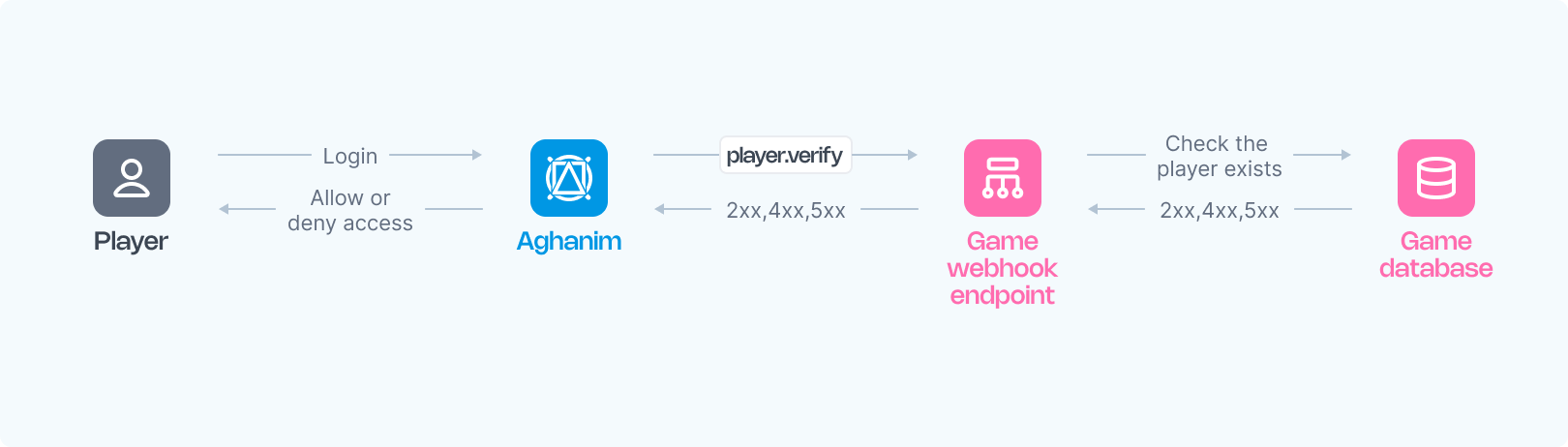
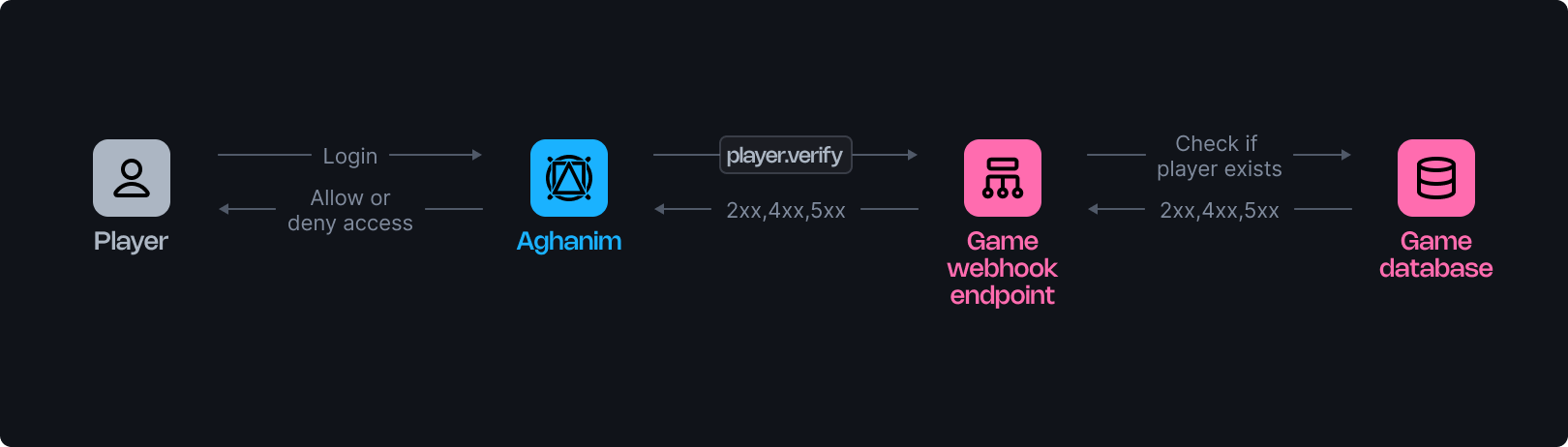
Aghanim utilizes a player verification webhook to inform your game about player logins, requiring confirmation from your webhook server to permit or deny access to the game hub. This document details the operation of these webhooks.
The webhook verifies a player's registration in your game and may be invoked multiple times during the player interactions with the game hub.
Requirements
To use the player verification webhook from Aghanim, you should have the webhook server configured as follows:
- HTTPS endpoint, accepting POST webhook requests.
- Listen for events, generated and signed by Aghanim.
- Verify players against your database to determine access to the game hub based on Player ID.
- Respond with a 2xx status code and the corresponding JSON payload for approval, a 4xx status code with an error payload for denial, or 5xx for server errors.
Configuration
Below are function templates designed for an endpoint that processes player verification events generated by Aghanim:
- Python
- Ruby
- Node.js
- Go
import fastapi, hashlib, hmac, json, typing
from fastapi.responses import JSONResponse

app = fastapi.FastAPI()

@app.post("/webhook")
async def webhook(request: fastapi.Request) -> dict[str, typing.Any]:
    secret_key = "<YOUR_S2S_KEY>"  # Replace with your actual webhook secret key

    raw_payload = await request.body()
    payload = raw_payload.decode()
    timestamp = request.headers["x-aghanim-signature-timestamp"]
    received_signature = request.headers["x-aghanim-signature"]

    if not verify_signature(secret_key, payload, timestamp, received_signature):
        raise fastapi.HTTPException(status_code=403, detail="Invalid signature")

    data = json.loads(payload)
    event_type = data["event_type"]
    event_data = data["event_data"]

    if event_type == "player.verify":
        player_data = verify_player(event_data)
        if not player_data:
            return JSONResponse(
                status_code=404,
                content={"status": "error", "code": "not_found", "message": "Player does not exist"},
            )
        return player_data

    raise fastapi.HTTPException(status_code=400, detail="Unknown event type")

def verify_signature(secret_key: str, payload: str, timestamp: str, received_signature: str) -> bool:
    signature_data = f"{timestamp}.{payload}"
    computed_hash = hmac.new(secret_key.encode(), signature_data.encode(), hashlib.sha256)
    computed_signature = computed_hash.hexdigest()
    return hmac.compare_digest(computed_signature, received_signature)

def verify_player(event_data: dict[str, typing.Any]) -> dict[str, typing.Any]:
    # Placeholder logic for fetching of player data.
    # In a real application, this function would interact with your database or user management system.
    return {
        "player_id": "r2d2-c3po",
        "name": "Molly",
        "attributes": {"level": 2},
        "country": "US"
    }
require 'sinatra'
require 'json'
require 'openssl'

post '/webhook' do
  secret_key = "<YOUR_S2S_KEY>"  # Replace with your actual webhook secret key

  payload = request.body.read
  timestamp = request.env["HTTP_X_AGHANIM_SIGNATURE_TIMESTAMP"]
  received_signature = request.env["HTTP_X_AGHANIM_SIGNATURE"]

  unless verify_signature(secret_key, payload, timestamp, received_signature)
    halt 403, "Invalid signature"
  end

  data = JSON.parse(payload)
  event_type = data["event_type"]
  event_data = data["event_data"]

  if event_type == "player.verify"
    player_data = fetch_player_data(event_data)
    if player_data.nil?
      content_type :json
      halt 404, { status: "error", code: "not_found", message: "Player does not exist" }.to_json
    end
    return player_data.to_json
  end

  halt 400, "Unknown event type"
end

def verify_signature(secret_key, payload, timestamp, received_signature)
  signature_data = "#{timestamp}.#{payload}"
  computed_signature = OpenSSL::HMAC.hexdigest('sha256', secret_key, signature_data)
  OpenSSL.secure_compare(computed_signature, received_signature)
end

def fetch_player_data(event_data)
  # Placeholder logic for fetching of player data.
  # In a real application, this function would interact with your database or user management system.
  { player_id: "r2d2-c3po", name: "Molly", attributes: { level: 2 }, country: "US" }
end
const express = require('express');
const crypto = require('crypto');

const app = express();

app.post('/webhook', express.raw({ type: "*/*" }), async (req, res) => {
  const secretKey = '<YOUR_S2S_KEY>'; // Replace with your actual webhook secret key

  const rawPayload = req.body;
  const timestamp = req.headers['x-aghanim-signature-timestamp'];
  const receivedSignature = req.headers['x-aghanim-signature'];

  if (!verifySignature(secretKey, rawPayload, timestamp, receivedSignature)) {
    return res.status(403).send('Invalid signature');
  }

  const payload = JSON.parse(req.body);
  const { event_type, event_data } = payload;

  if (event_type === 'player.verify') {
    const playerData = fetchPlayerData(event_data);
    if (!playerData) {
      return res.status(404).json({ status: 'error', code: 'not_found', message: 'Player does not exist' });
    }
    return res.json(playerData);
  }

  return res.status(400).send('Unknown event type');
});

function verifySignature(secretKey, payload, timestamp, receivedSignature) {
  const signatureData = `${timestamp}.${payload}`;
  const computedSignature = crypto
    .createHmac('sha256', secretKey)
    .update(signatureData)
    .digest('hex');
  return crypto.timingSafeEqual(Buffer.from(computedSignature), Buffer.from(receivedSignature));
}

function fetchPlayerData(event_data) {
  // Placeholder logic for fetching player data.
  // In a real application, this function would interact with your database or user management system.
  return {
    player_id: 'r2d2-c3po',
    name: 'Molly',
    attributes: { level: 2 },
    country: 'US'
  };
}
package main

import (
  "crypto/hmac"
  "crypto/sha256"
  "encoding/hex"
  "encoding/json"
  "fmt"
  "io/ioutil"
  "net/http"
)

func webhookHandler(w http.ResponseWriter, r *http.Request) {
  secretKey := "<YOUR_S2S_KEY>"  // Replace with your actual webhook secret key

  rawPayload, _ := ioutil.ReadAll(r.Body)
  payload := string(rawPayload)
  timestamp := r.Header.Get("X-Aghanim-Signature-Timestamp")
  receivedSignature := r.Header.Get("X-Aghanim-Signature")

  if !verifySignature(secretKey, payload, timestamp, receivedSignature) {
    http.Error(w, "Invalid signature", http.StatusForbidden)
    return
  }

  var data map[string]interface{}
  if err := json.Unmarshal(rawPayload, &data); err != nil {
    http.Error(w, "Invalid payload", http.StatusBadRequest)
    return
  }

  eventType := data["event_type"].(string)
  eventData := data["event_data"].(map[string]interface{})

  if eventType == "player.verify" {
    playerData := verifyPlayer(eventData)
    if playerData == nil {
      w.Header().Set("Content-Type", "application/json")
      w.WriteHeader(http.StatusNotFound)
      json.NewEncoder(w).Encode(map[string]string{
        "status":  "error",
        "code":    "not_found",
        "message": "Player does not exist",
      })
      return
    }
    json.NewEncoder(w).Encode(playerData)
    return
  }

  http.Error(w, "Unknown event type", http.StatusBadRequest)
}

func verifySignature(secretKey, payload, timestamp, receivedSignature string) bool {
  signatureData := fmt.Sprintf("%s.%s", timestamp, payload)
  mac := hmac.New(sha256.New, []byte(secretKey))
  mac.Write([]byte(signatureData))
  computedSignature := hex.EncodeToString(mac.Sum(nil))
  return hmac.Equal([]byte(computedSignature), []byte(receivedSignature))
}

func verifyPlayer(eventData map[string]interface{}) map[string]interface{} {
  // Placeholder logic for fetching player data.
  // In a real application, this function would interact with your database or user management system.
  return map[string]interface{}{
    "player_id": "r2d2-c3po",
    "name": "Molly",
    "attributes": map[string]interface{}{"level": 2},
    "country": "US",
  }
}
Once your function is ready:
- Make your endpoint available.
- Register your endpoint within Aghanim account → Game → Webhooks → Add webhook by choosing the player verification event type.
Alternatively, you can register your endpoint within Aghanim using the Create Webhook API method.
Trigger values
| Value | Description |
|---|---|
hub.login | When the player opens the game hub. |
hub.interact | Background re-verification, fires every 6 hours after the player's previous hub visit. |
hub.purchase | When the player clicks the buy button in the store to confirm that the item is still available based on the player's attributes. Fires only when the Store item has segmentation rules. |
hub.store.open | When the store is opened. Fires only when Store Rules include a verify_player action. |
order.captured | Just before payment processing begins. Fires only when the Store item has segmentation rules. |
s2s.user.authorize | On the first S2S authorize call for a newly created user. Subsequent calls for the same user do not emit a webhook. |
s2s.player.issue_loyalty_points | On the first S2S loyalty points issuance for a newly created user. Subsequent calls for the same user do not emit a webhook. |
liveops.execute_action | When a LiveOps action is executed. |
test | When using the "Send test event" in the Dashboard. |
See the full events and triggers matrix for how player.verify relates to other event types.
Request schema
Below is an example of an player.verify webhook request:
- HTTP
- cURL
POST /your/webhook/uri HTTP/1.1
Content-Type: application/json
Host: your-webhook-endpoint.com
User-Agent: Aghanim/0.1.0
X-Aghanim-Signature: 2e45ed4dede5e09506717490655d2f78e96d4261040ef48cc623a780bda38812
X-Aghanim-Signature-Timestamp: 1725548450

{
  "event_type": "player.verify",
  "event_data": {
    "player_id": "2D2R-OP3C"
  },
  "event_time": 1725548450,
  "event_id": "whevt_eCacGbJVbvToOgzjXUgOCitkQE",
  "idempotency_key": null,
  "request_id": "d1593e9c-c291-4004-8846-6679c2e5810b",
  "sandbox": false,
  "trigger": "hub.login",
  "transaction_id": "whtx_eCacGbJVbvT",
  "context": null,
  "game_id": "gm_exTAyxPsVwh"
}
curl "https://your-webhook-endpoint.com/your/webhook/uri" \
    -X POST \
    -H "Content-Type: application/json" \
    -H "User-Agent: Aghanim/0.1.0" \
    -H "X-Aghanim-Signature: 2e45ed4dede5e09506717490655d2f78e96d4261040ef48cc623a780bda38812" \
    -H "X-Aghanim-Signature-Timestamp: 1725548450" \
    -d '{
      "event_type": "player.verify",
      "event_data": {
        "player_id": "2D2R-OP3C"
      },
      "event_time": 1725548450,
      "event_id": "whevt_eCacGbJVbvToOgzjXUgOCitkQE",
      "idempotency_key": null,
      "request_id": "d1593e9c-c291-4004-8846-6679c2e5810b",
      "sandbox": false,
      "trigger": "hub.login",
      "transaction_id": "whtx_eCacGbJVbvT",
      "context": null,
      "game_id": "gm_exTAyxPsVwh"
    }'
The Event schema
| Key | Type | Description |
|---|---|---|
event_id | string | Unique Event ID generated by Aghanim. |
game_id | string | Your game ID in the Aghanim system. |
event_type | string | The type of the event, player.verify in this case. |
event_time | number | The time the event was sent, in Unix epoch time. May differ across duplicate deliveries of the same event. |
event_data | EventData | Contains the event-specific data, with possible keys for inherited objects. |
idempotency_key | string|null | Ensures webhook actions are executed only once, even if retried. Can be null depending on event type. |
request_id | string|null | If the event was triggered by an API request, the request ID is included. |
sandbox | boolean | Indicates whether the event was sent from the sandbox game environment. |
trigger | string|null | The trigger that caused the event to be sent. |
transaction_id | string | The transaction ID generated by Aghanim. This ID may be the same for multiple events emitted within the same transaction. |
context | object|null | Contextual information about the event. |
The EventData schema
| Key | Type | Description |
|---|---|---|
player_id | string | The unique Player ID chosen for player authentication. |
Response schema
Upon receiving a player.verify webhook, your server must respond with the appropriate HTTP status code and JSON payload.
Success response
Return a 2xx status code with a JSON payload containing the player data when the player is verified successfully:
| Key | Type | Description | Required? |
|---|---|---|---|
player_id | string | Unique Player ID chosen for player authentication. | Yes |
name | string | Player's nickname. | Yes |
attributes | Attributes | Basic player attributes expected by Aghanim. | Yes |
avatar_url | string | Player's avatar URL. | No |
email | string | Player's email address. | No |
banned | boolean | Indicates whether the player is banned in the game. | No |
segments | string[] | Segments to which the player belongs. | No |
country | string | Two-letter country code according to ISO 3166‑1. | No |
custom_attributes | CustomAttributes | Custom player attributes. | No |
balances | Balance[] | Player's virtual currency balances. | No |
banned is a sticky flagThe banned flag is sticky: once you return banned: true, the player stays flagged until you return an explicit banned: false. Omitting the field in a later response does not clear it (by design).
The Balance object
The Balance object contains the following fields:
| Key | Type | Description | Required? |
|---|---|---|---|
sku | string | Item SKU matching on both the game and Aghanim sides linked to the virtual currency. | Yes |
quantity | number | Player's balance in the currency. | Yes |
The Attributes object
The Attributes object contains the following fields:
| Key | Type | Description | Required? |
|---|---|---|---|
level | number | Player's level in the game. | Yes |
platform | string | The platform on which the player is using the game hub. Possible values: ios, android. | No |
marketplace | string | Marketplace from which the player originates. Possible values: app_store, google_play, other. | No |
soft_currency_amount | number | Player's soft currency balance. | No |
hard_currency_amount | number | Player's hard currency balance. | No |
tags | string[] | A list of tags that mark the player. Supported value: tester — flags the player as a test account and keeps the player's access to the hub even while it is in maintenance mode. | No |
registered_at | number | Unix timestamp when the player registered in the game. It may predate the creation of the player's Aghanim account. | No |
first_login_ip | string | IP address of the player's first login in the game, as reported by the game. Max 64 characters. | No |
is_verified | boolean | Whether the player's account is verified on the game side. | No |
Aghanim stores registered_at, first_login_ip, and is_verified on the player profile and includes them in the evidence package when a payment made by the player is disputed. You can also write them directly through the Payment Dispute Evidence API.
The CustomAttributes object
The CustomAttributes object contains key-value pairs, for example:
{
  "is_premium": true,
  "age": 25,
  "favorite_color": "blue",
  "install_date": 1704070800
}
These attributes can be used later in LiveOps or Segmentation for constructing logic conditions to target specific player segments.
Important: custom attributes must be declared in Game → Player attributes.
Success response example
{
  "player_id": "2D2R-OP3C",
  "name": "Beebee-Ate",
  "avatar_url": "https://static-platform.aghanim.com/images/bb8.jpg",
  "attributes": {"level": 2, "tags": ["tester"]},
  "country": "US"
}
Error responses
When player verification fails, your server must return a 4xx status code with the following JSON structure:
{
  "status": "error",
  "code": "<error_code>",
  "message": "<optional human-readable description>"
}
The HTTP status code determines how Aghanim handles the response. The code field refines which failure is applied — it is matched first against the recognized codes — and message, when present, overrides the text shown to the player. A 4xx response with no valid JSON body or no recognized code is treated as an infrastructure-level error and does not force logout (see the note below the table).
| HTTP Status | Code | Description | Hub behavior |
|---|---|---|---|
403 | banned | Player is banned in the game. | Force logout. Player sees: "Your game account has been suspended." |
404 | not_found | Player does not exist. | Force logout. Player sees: "Your game account was not found. Please re-login through the game." |
410 | deleted | Player existed previously but has been deleted. | Force logout. Player sees: "Your game account is no longer active." |
422 | not_eligible | Player has not met the requirements to access the Hub (e.g. level, playtime, completed quests). | Force logout. Player sees: "You haven't unlocked the Hub yet. Keep playing to gain access!" |
Error response examples
{
  "status": "error",
  "code": "banned",
  "message": "Player is banned"
}
{
  "status": "error",
  "code": "not_eligible",
  "message": "Player has not reached the required level"
}
Aghanim only forces logout on a 4xx response that carries a valid JSON body with a recognized code from the table above. If the response body is not valid JSON, omits code, or carries an unrecognized code (e.g. an HTML error page returned by Cloudflare, a WAF, or a reverse proxy), Aghanim treats it as an infrastructure-level error and does not force logout the player: on login the player is refused entry, and during background re-verification no action is taken.
Server errors
Return a 5xx status code only for unexpected server-side failures (e.g. database unavailable, internal exception). Do not use 5xx codes to communicate player-level verification results. The player.verify webhook is sent synchronously as a single attempt: Aghanim does not retry player.verify requests that receive 5xx responses, and a 5xx denies that verification without forcing logout.
Need help?
Contact our integration team at integration@aghanim.com