플레이어 검증 웹훅
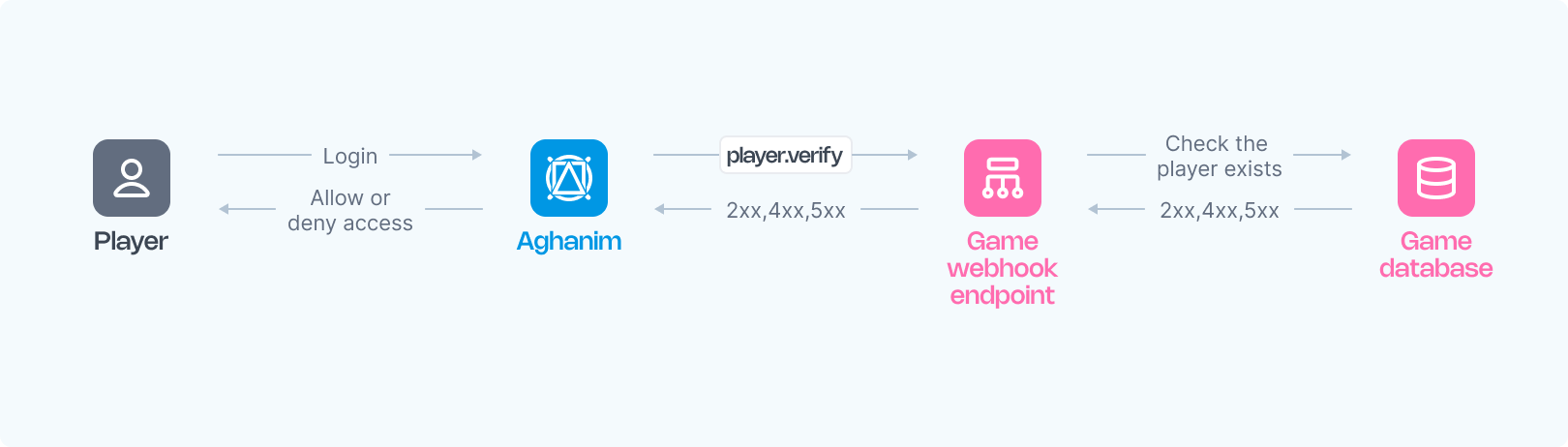
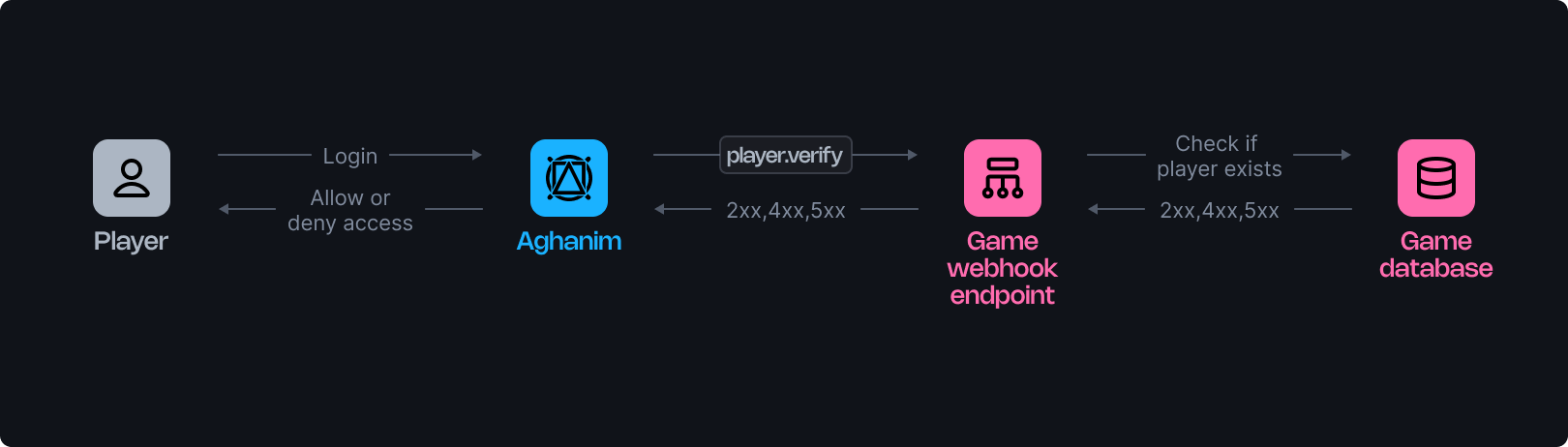
Aghanim은 플레이어 검증 웹훅을 활용하여 플레이어 로그인에 대한 정보를 게임에 알리고, 게임 허브에 대한 액세스를 허용하거나 거부하기 위해 웹훅 서버에서 확인을 요구합니다. 이 문서는 이러한 웹훅의 운영에 대한 정보를 제공합니다.
웹훅은 게임에서 플레이어의 등록을 확인하고 Game Hub와의 플레이어 상호작용 중 여러 번 호출될 수 있습니다.
요구 사항
Aghanim에서 플레이어 검증 웹훅을 사용하려면 다음과 같이 웹훅 서버를 구성해야 합니다:
- POST 웹훅 요청을 수락하는 HTTPS 엔드포인트.
- Aghanim이 생성하고 서명한 이벤트를 수신합니다.
- 플레이어 ID를 기준으로 게임 허브에 대한 액세스를 확인하려면 데이터베이스에서 플레이어를 검증합니다.
- 승인을 위해 2xx 상태 코드 및 해당 JSON 페이로드를, 거부를 위해 오류 페이로드가 포함된 4xx 상태 코드를, 또는 서버 오류에 대해 5xx를 응답합니다.
구성
다음은 Aghanim에서 생성한 플레이어 검증 이벤트를 처리하는 엔드포인트용 함수 템플릿입니다:
- Python
- Ruby
- Node.js
- Go
import fastapi, hashlib, hmac, json, typing
from fastapi.responses import JSONResponse

app = fastapi.FastAPI()

@app.post("/webhook")
async def webhook(request: fastapi.Request) -> dict[str, typing.Any]:
    secret_key = "<YOUR_S2S_KEY>"  # 실제 웹훅 비밀 키로 교체하세요

    raw_payload = await request.body()
    payload = raw_payload.decode()
    timestamp = request.headers["x-aghanim-signature-timestamp"]
    received_signature = request.headers["x-aghanim-signature"]

    if not verify_signature(secret_key, payload, timestamp, received_signature):
        raise fastapi.HTTPException(status_code=403, detail="Invalid signature")

    data = json.loads(payload)
    event_type = data["event_type"]
    event_data = data["event_data"]

    if event_type == "player.verify":
        player_data = verify_player(event_data)
        if not player_data:
            return JSONResponse(
                status_code=404,
                content={"status": "error", "code": "not_found", "message": "Player does not exist"},
            )
        return player_data

    raise fastapi.HTTPException(status_code=400, detail="Unknown event type")

def verify_signature(secret_key: str, payload: str, timestamp: str, received_signature: str) -> bool:
    signature_data = f"{timestamp}.{payload}"
    computed_hash = hmac.new(secret_key.encode(), signature_data.encode(), hashlib.sha256)
    computed_signature = computed_hash.hexdigest()
    return hmac.compare_digest(computed_signature, received_signature)

def verify_player(event_data: dict[str, typing.Any]) -> dict[str, typing.Any]:
    # 플레이어 데이터를 가져오는 데 사용되는 자리 표시자 로직입니다.
    # 실제 애플리케이션에서는 이 함수가 데이터베이스나 사용자 관리 시스템과 상호작용합니다.
    return {
        "player_id": "r2d2-c3po",
        "name": "Molly",
        "attributes": {"level": 2},
        "country": "US"
    }
require 'sinatra'
require 'json'
require 'openssl'

post '/webhook' do
  secret_key = "<YOUR_S2S_KEY>"  # 실제 웹훅 비밀 키로 교체하세요

  payload = request.body.read
  timestamp = request.env["HTTP_X_AGHANIM_SIGNATURE_TIMESTAMP"]
  received_signature = request.env["HTTP_X_AGHANIM_SIGNATURE"]

  unless verify_signature(secret_key, payload, timestamp, received_signature)
    halt 403, "Invalid signature"
  end

  data = JSON.parse(payload)
  event_type = data["event_type"]
  event_data = data["event_data"]

  if event_type == "player.verify"
    player_data = fetch_player_data(event_data)
    if player_data.nil?
      content_type :json
      halt 404, { status: "error", code: "not_found", message: "Player does not exist" }.to_json
    end
    return player_data.to_json
  end

  halt 400, "Unknown event type"
end

def verify_signature(secret_key, payload, timestamp, received_signature)
  signature_data = "#{timestamp}.#{payload}"
  computed_signature = OpenSSL::HMAC.hexdigest('sha256', secret_key, signature_data)
  OpenSSL.secure_compare(computed_signature, received_signature)
end

def fetch_player_data(event_data)
  # 플레이어 데이터를 가져오기 위한 플레이스홀더 로직입니다.
  # 실제 애플리케이션에서는 이 함수가 데이터베이스나 사용자 관리 시스템과 상호작용합니다.
  { player_id: "r2d2-c3po", name: "Molly", attributes: { level: 2 }, country: "US" }
end
const express = require('express');
const crypto = require('crypto');

const app = express();

app.post('/webhook', express.raw({ type: "*/*" }), async (req, res) => {
  const secretKey = '<YOUR_S2S_KEY>'; // 실제 웹훅 비밀 키로 교체하세요

  const rawPayload = req.body;
  const timestamp = req.headers['x-aghanim-signature-timestamp'];
  const receivedSignature = req.headers['x-aghanim-signature'];

  if (!verifySignature(secretKey, rawPayload, timestamp, receivedSignature)) {
    return res.status(403).send('Invalid signature');
  }

  const payload = JSON.parse(req.body);
  const { event_type, event_data } = payload;

  if (event_type === 'player.verify') {
    const playerData = fetchPlayerData(event_data);
    if (!playerData) {
      return res.status(404).json({ status: 'error', code: 'not_found', message: 'Player does not exist' });
    }
    return res.json(playerData);
  }

  return res.status(400).send('Unknown event type');
});

function verifySignature(secretKey, payload, timestamp, receivedSignature) {
  const signatureData = `${timestamp}.${payload}`;
  const computedSignature = crypto
    .createHmac('sha256', secretKey)
    .update(signatureData)
    .digest('hex');
  return crypto.timingSafeEqual(Buffer.from(computedSignature), Buffer.from(receivedSignature));
}

function fetchPlayerData(event_data) {
  // 플레이어 데이터를 가져오는 데 사용되는 자리 표시자 로직입니다.
  // 실제 애플리케이션에서는 이 함수가 데이터베이스나 사용자 관리 시스템과 상호 작용을 합니다.
  return {
    player_id: 'r2d2-c3po',
    name: 'Molly',
    attributes: { level: 2 },
    country: 'US'
  };
}
package main

import (
  "crypto/hmac"
  "crypto/sha256"
  "encoding/hex"
  "encoding/json"
  "fmt"
  "io/ioutil"
  "net/http"
)

func webhookHandler(w http.ResponseWriter, r *http.Request) {
  secretKey := "<YOUR_S2S_KEY>"  // 실제 웹훅 비밀 키로 교체하세요

  rawPayload, _ := ioutil.ReadAll(r.Body)
  payload := string(rawPayload)
  timestamp := r.Header.Get("X-Aghanim-Signature-Timestamp")
  receivedSignature := r.Header.Get("X-Aghanim-Signature")

  if !verifySignature(secretKey, payload, timestamp, receivedSignature) {
    http.Error(w, "Invalid signature", http.StatusForbidden)
    return
  }

  var data map[string]interface{}
  if err := json.Unmarshal(rawPayload, &data); err != nil {
    http.Error(w, "Invalid payload", http.StatusBadRequest)
    return
  }

  eventType := data["event_type"].(string)
  eventData := data["event_data"].(map[string]interface{})

  if eventType == "player.verify" {
    playerData := verifyPlayer(eventData)
    if playerData == nil {
      w.Header().Set("Content-Type", "application/json")
      w.WriteHeader(http.StatusNotFound)
      json.NewEncoder(w).Encode(map[string]string{
        "status":  "error",
        "code":    "not_found",
        "message": "Player does not exist",
      })
      return
    }
    json.NewEncoder(w).Encode(playerData)
    return
  }

  http.Error(w, "Unknown event type", http.StatusBadRequest)
}

func verifySignature(secretKey, payload, timestamp, receivedSignature string) bool {
  signatureData := fmt.Sprintf("%s.%s", timestamp, payload)
  mac := hmac.New(sha256.New, []byte(secretKey))
  mac.Write([]byte(signatureData))
  computedSignature := hex.EncodeToString(mac.Sum(nil))
  return hmac.Equal([]byte(computedSignature), []byte(receivedSignature))
}

func verifyPlayer(eventData map[string]interface{}) map[string]interface{} {
  // 플레이어 데이터를 가져오는 데 사용되는 자리 표시자 로직입니다.
  // 실제 애플리케이션에서는 이 함수가 데이터베이스나 사용자 관리 시스템과 상호 작용을 합니다.
  return map[string]interface{}{
    "player_id": "r2d2-c3po",
    "name": "Molly",
    "attributes": map[string]interface{}{"level": 2},
    "country": "US",
  }
}
함수가 준비되면:
- 엔드포인트를 사용 가능하게 설정하세요.
- Aghanim 계정 내에서 엔드포인트를 등록하세요 → 게임 → 웹훅 → 새로운 웹훅에서 플레이어 검증 이벤트 유형을 선택하여 등록하세요.
대안으로, 웹후크 생성 API 방법을 사용하여 Aghanim 내에서 엔드포인트를 등록할 수 있습니다.
트리거 값
| 값 | 설명 |
|---|---|
hub.login | 플레이어가 게임 허브를 열 때. |
hub.interact | 백그라운드 재검증. 플레이어의 이전 허브 방문 후 6시간마다 트리거됩니다. |
hub.purchase | 플레이어가 상점에서 구매 버튼을 클릭하여 아이템이 여전히 사용 가능한지 플레이어의 속성 기준으로 확인할 때. 스토어 아이템에 세그먼트 규칙이 있는 경우에만 트리거됩니다. |
hub.store.open | 상점이 열릴 때. 상점 규칙에 verify_player 작업이 포함된 경우에만 트리거됩니다. |
order.captured | 결제 처리가 시작되기 직전. 스토어 아이템에 세그먼트 규칙이 있는 경우에만 트리거됩니다. |
s2s.user.authorize | 새로 생성된 사용자에 대한 첫 S2S authorize 호출 시. 동일한 사용자에 대한 이후 호출에서는 웹훅이 전송되지 않습니다. |
s2s.player.issue_loyalty_points | 새로 생성된 사용자에 대한 첫 S2S 로열티 포인트 지급 시. 동일한 사용자에 대한 이후 호출에서는 웹훅이 전송되지 않습니다. |
liveops.execute_action | LiveOps 작업이 실행될 때. |
test | Dashboard에서 "Send test event"를 사용할 때. |
player.verify가 다른 이벤트 유형과 어떻게 관련되는지는 전체 이벤트 및 트리거 매트릭스를 참조하세요.
요청 스키마
아래는 예시입니다 player.verify 웹훅 요청:
- HTTP
- cURL
POST /your/webhook/uri HTTP/1.1
Content-Type: application/json
Host: your-webhook-endpoint.com
User-Agent: Aghanim/0.1.0
X-Aghanim-Signature: 2e45ed4dede5e09506717490655d2f78e96d4261040ef48cc623a780bda38812
X-Aghanim-Signature-Timestamp: 1725548450

{
  "event_type": "player.verify",
  "event_data": {
    "player_id": "2D2R-OP3C"
  },
  "event_time": 1725548450,
  "event_id": "whevt_eCacGbJVbvToOgzjXUgOCitkQE",
  "idempotency_key": null,
  "request_id": "d1593e9c-c291-4004-8846-6679c2e5810b",
  "sandbox": false,
  "trigger": "hub.login",
  "transaction_id": "whtx_eCacGbJVbvT",
  "context": null,
  "game_id": "gm_exTAyxPsVwh"
}
curl "https://your-webhook-endpoint.com/your/webhook/uri" \
    -X POST \
    -H "Content-Type: application/json" \
    -H "User-Agent: Aghanim/0.1.0" \
    -H "X-Aghanim-Signature: 2e45ed4dede5e09506717490655d2f78e96d4261040ef48cc623a780bda38812" \
    -H "X-Aghanim-Signature-Timestamp: 1725548450" \
    -d '{
      "event_type": "player.verify",
      "event_data": {
        "player_id": "2D2R-OP3C"
      },
      "event_time": 1725548450,
      "event_id": "whevt_eCacGbJVbvToOgzjXUgOCitkQE",
      "idempotency_key": null,
      "request_id": "d1593e9c-c291-4004-8846-6679c2e5810b",
      "sandbox": false,
      "trigger": "hub.login",
      "transaction_id": "whtx_eCacGbJVbvT",
      "context": null,
      "game_id": "gm_exTAyxPsVwh"
    }'
이벤트 스키마
| Key | 유형 | 설명 |
|---|---|---|
event_id | string | Aghanim에 의해 생성된 고유 이벤트 ID. |
game_id | string | Aghanim 시스템에서의 귀하의 게임 ID. |
event_type | string | 이벤트의 유형, player.verify 이럴 경우. |
event_time | number | The time the event was sent, in Unix epoch time. May differ across duplicate deliveries of the same event. |
event_data | EventData | 이벤트 특정 데이터가 포함되어 있으며, 상속된 객체에 대한 가능한 키가 포함됩니다. |
idempotency_key | string|null | 웹훅 작업이 재시도되어도 한 번만 실행되도록 보장합니다. 일 수 있습니다 null 이벤트 유형에 따라 달라집니다. |
request_id | string|null | 이벤트가 API 요청에 의해 트리거된 경우, 요청 ID가 포함됩니다. |
sandbox | boolean | 이 이벤트가 샌드박스 게임 환경에서 전송되었는지를 표시합니다. |
trigger | string|null | 이벤트가 전송된 원인이 된 트리거입니다. |
transaction_id | string | Aghanim이 생성한 거래 ID입니다. 이 ID는 동일한 거래 내에서 발생한 여러 이벤트에서 동일할 수 있습니다. |
context | object|null | 이벤트에 대한 컨텍스트 정보. |
EventData 스키마
| Key | 유형 | 설명 |
|---|---|---|
player_id | string | 플레이어 인증을 위해 선택된 고유한 플레이어 ID. |
응답 스키마
player.verify 웹훅을 수신하면 서버는 적절한 HTTP 상태 코드와 JSON 페이로드로 응답해야 합니다.
성공 응답
플레이어가 성공적으로 확인되면 플레이어 데이터가 포함된 JSON 페이로드와 함께 2xx 상태 코드를 반환합니다:
| Key | 유형 | 설명 | 필수 여부 |
|---|---|---|---|
player_id | string | 플레이어 인증을 위해 선택된 고유한 플레이어 ID. | 예 |
name | string | 플레이어의 닉네임. | 예 |
attributes | Attributes | Aghanim이 기대하는 기본 플레이어 속성. | 예 |
avatar_url | string | 플레이어의 아바타 URL. | 아니오 |
email | string | 플레이어의 이메일 주소. | 아니오 |
banned | boolean | 플레이어가 게임에서 금지되었는지 여부를 나타냅니다. | 아니오 |
segments | string[] | 플레이어가 속한 세그먼트. | 아니오 |
country | string | ISO 3166‑1에 따른 두 자리 국가 코드. | 아니오 |
custom_attributes | CustomAttributes | 사용자 정의 플레이어 속성. | 아니오 |
balances | Balance[] | 플레이어의 재화 잔액. | 아니오 |
banned는 고정 플래그입니다banned 플래그는 고정적입니다. 한 번 banned: true를 반환하면, 명시적으로 banned: false를 반환할 때까지 플레이어는 플래그된 상태로 유지됩니다. 이후 응답에서 필드를 생략해도 플래그는 해제되지 않습니다(의도된 동작).
Balance 객체
Balance 객체는 다음 필드를 포함합니다:
| Key | 유형 | 설명 | 필수 여부 |
|---|---|---|---|
sku | string | 재화와 연동된 아이템 SKU가 게임 측과 Aghanim 측 모두에서 일치해야 합니다. | 예 |
quantity | number | 플레이어의 화폐 잔액입니다. | 예 |
Attributes 객체
Attributes 객체는 다음 필드를 포함합니다:
| Key | 유형 | 설명 | 필수 여부 |
|---|---|---|---|
level | number | 게임에서 플레이어의 레벨. | 예 |
platform | string | 플레이어가 게임 허브를 사용하는 플랫폼입니다. 가능한 값: ios, android. | 아니오 |
marketplace | string | 플레이어 유입 경로로 사용된 마켓플레이스. 가능한 값: app_store, google_play, other. | 아니오 |
soft_currency_amount | number | 플레이어의 소프트 재화 잔액. | 아니오 |
hard_currency_amount | number | 플레이어의 하드 재화 잔액. | 아니오 |
CustomAttributes 객체
CustomAttributes 객체에는 키-값 쌍이 포함되어 있습니다. 예:
{
  "is_premium": true,
  "age": 25,
  "favorite_color": "blue",
  "install_date": 1704070800
}
이러한 속성은 나중에 특정 플레이어 세그먼트를 타겟으로 하기 위해 LiveOps 또는 세분화 에서 로직 조건을 구성할 때 사용될 수 있습니다.
중요: 사용자 정의 속성은 게임 → 플레이어 속성에서 선언해야 합니다.
성공적인 응답 예시
{
  "player_id": "2D2R-OP3C",
  "name": "비비에이트",
  "avatar_url": "https://static-platform.aghanim.com/images/bb8.jpg",
  "attributes": {"level": 2},
  "country": "US"
}
오류 응답
플레이어 확인에 실패하면 서버는 다음 JSON 구조와 함께 4xx 상태 코드를 반환해야 합니다:
{
  "status": "error",
  "code": "<error_code>",
  "message": "<optional human-readable description>"
}
HTTP 상태 코드에 따라 Aghanim이 응답을 어떻게 처리할지 결정됩니다. code 필드는 적용할 실패를 더 구체화하며(먼저 인식된 코드와 대조됨), message가 있는 경우 플레이어에게 표시되는 텍스트를 재정의합니다. 유효한 JSON 본문이 없거나 인식된 code가 없는 4xx 응답은 인프라 수준 오류로 처리되며 강제 로그아웃하지 않습니다(아래 표 뒤의 참고 참조).
| HTTP 상태 | 코드 | 설명 | Hub 동작 |
|---|---|---|---|
403 | banned | 플레이어가 게임에서 차단되었습니다. | 강제 로그아웃. 플레이어에 표시: "게임 계정이 정지되었습니다." |
404 | not_found | 플레이어가 존재하지 않습니다. | 강제 로그아웃. 플레이어에 표시: "게임 계정을 찾을 수 없습니다. 게임을 통해 다시 로그인해 주세요." |
410 | deleted | 플레이어는 이전에 존재했지만 삭제되었습니다. | 강제 로그아웃. 플레이어에 표시: "게임 계정이 더 이상 활성화되어 있지 않습니다." |
422 | not_eligible | 플레이어가 Hub에 액세스하기 위한 요구 사항(예: 레벨, 플레이 시간, 완료한 퀘스트)을 충족하지 못했습니다. | 강제 로그아웃. 플레이어에 표시: "아직 Hub를 잠금 해제하지 않았습니다. 계속 플레이해서 액세스 권한을 획득하세요!" |
오류 응답 예시
{
  "status": "error",
  "code": "banned",
  "message": "Player is banned"
}
{
  "status": "error",
  "code": "not_eligible",
  "message": "Player has not reached the required level"
}
Aghanim은 위 표에 있는 인식된 code가 포함된 유효한 JSON 본문을 가진 4xx 응답에 대해서만 강제 로그아웃을 수행합니다. 응답 본문이 유효한 JSON이 아니거나, code를 생략했거나, 인식되지 않는 code를 포함하는 경우(예: Cloudflare, WAF 또는 리버스 프록시가 반환한 HTML 오류 페이지) Aghanim은 이를 인프라 수준 오류로 처리하며 플레이어를 강제 로그아웃하지 않습니다. 로그인 시 플레이어는 입장이 거부되고, 백그라운드 재검증 중에는 아무 작업도 수행되지 않습니다.
서버 오류
예기치 않은 서버 측 장애(예: 데이터베이스를 사용할 수 없음, 내부 예외)에 대해서만 5xx 상태 코드를 반환합니다. 플레이어 수준의 확인 결과를 전달하기 위해 5xx 코드를 사용하지 마세요. player.verify 웹훅은 단일 시도로 동기적으로 전송됩니다. Aghanim은 5xx 응답을 받은 player.verify 요청을 재시도하지 않으며, 5xx는 강제 로그아웃 없이 해당 검증을 거부합니다.
도움이 필요하세요?
통합팀에 문의하십시오 integration@aghanim.com