Webhook Overview
Aghanim uses webhooks to notify your game about player-triggered events within the Aghanim-generated game hub. These webhooks facilitate essential communication between Aghanim and your game. This guide outlines the workings and structure of Aghanim webhooks.
Webhooks are HTTP callbacks that Aghanim sends to the URLs you specify under Game → Webhooks → Add webhook in your Aghanim account. These requests are activated by specific events and carry a JSON payload with the relevant event data.
Aghanim's AI Coding Tools can scaffold any Aghanim webhook handler in your project's stack - with signature verification, idempotency, and tests.
Schema
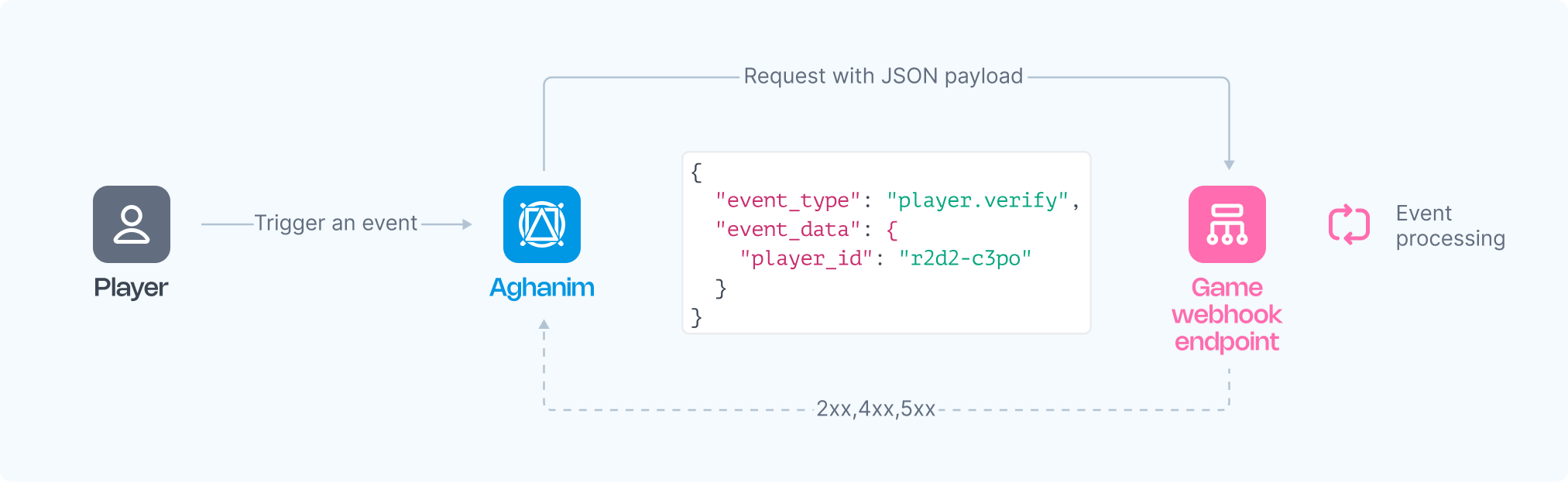
The Aghanim service sends HTTP POST requests to your webhook server, carrying a JSON payload structured with event data as follows:
{
  "event_type": "player.verify",
  "event_data": {"player_id": "2D2R-OP3C"},
  "event_time": 1725534306,
  "event_id": "whevt_eBZXsUEITGeDcILaZFUvPthxkr",
  "idempotency_key": null,
  "sandbox": false,
  "trigger": "hub.login",
  "request_id": "d1593e9c-c291-4004-8846-6679c2e5810b",
  "transaction_id": "whtx_eBZXsUEITGeDcILaZFUvPthxkr",
  "context": null,
  "game_id": "gm_exTAyxPsVwh"
}
The Event schema
| Key | Type | Description |
|---|---|---|
event_id | string | Unique Event ID generated by Aghanim. |
game_id | string | Your game ID in the Aghanim system. |
event_type | string | The type of event. Possible values: player.verify, item.add, item.remove, order.paid, order.canceled, order.refunded, coupon.redeemed, ingame.push, ingame.popup. |
event_time | number | The time the event was sent, in Unix epoch time. May differ across duplicate deliveries of the same event. |
event_data | object | Contains the event-specific data, with possible keys for inherited objects. |
idempotency_key | string|null | Ensures webhook actions are executed only once, even if retried. Can be null depending on event type. |
request_id | string|null | If the event was triggered by an API request, the request ID is included. |
sandbox | boolean | Indicates whether the event was sent from the sandbox game environment. |
trigger | string|null | The trigger that caused the event to be sent. |
transaction_id | string | The transaction ID generated by Aghanim. This ID may be the same for multiple events emitted within the same transaction. |
context | object|null | Contextual information about the event. |
Setting up webhook integration
To manage events from Aghanim, you need to develop one or more functions. You can either process all events through a single endpoint or use multiple endpoints, each dedicated to specific events or different logic.
Requirements
Your function(s) should adhere to the following requirements and logic:
- HTTPS endpoint, accepting POST webhook requests.
- Listen for events, generated and signed by Aghanim.
- Handle the
idempotency_keyincluded in the webhook payload to prevent processing duplicate webhooks. - Appropriately process incoming requests, such as verifying players against your database to determine access to the game hub based on Player ID, or crediting purchased items to the player's account.
- Respond with 2xx status codes for access approval or once an item is credited, and 4xx or 5xx for denial or errors.
Registering your endpoint within Aghanim
- Make your endpoint(s) available.
- Register your endpoint(s) within Aghanim account → Game → Webhooks → Add webhook by choosing those events you want to be processed by this endpoint.
- Copy a generated secret key and specify it in your webhook function for request signature validation.
Alternatively, you can register your endpoint within Aghanim using the Create Webhook API method.
Responding to events
In response to webhooks, Aghanim expects:
2xx(Success): This code indicates that the event has been successfully processed by a webhook function in accordance with its logic.4xx(Client Error): The behavior depends on the webhook type:- For most webhooks, these codes trigger a retry sequence. If retries fail, Aghanim discontinues attempts, and the event is lost.
- Some webhooks define status-specific behavior instead of retries: the HTTP status code determines how Aghanim reacts, and a structured JSON error body refines the result. See each webhook's documentation for details (e.g., Player Verify).
- For webhooks with status-specific behavior, some
4xxstatuses are integration-level signals rather than player-level denials. For Player Verify,400(validation_error, the request data was invalid) and401(invalid_signature, the webhook signature could not be verified) deny verification without logging the player out or showing a player-facing message — on login the player is simply refused entry, and during background re-verification no action is taken.
5xx(Server Error): These codes indicate temporary server-side failures (e.g. database unavailable, internal exception). Aghanim will automatically retry these requests according to the retry schedule — except for the webhooks delivered synchronously, which are not retried.
Delivery guarantees
Aghanim delivers webhooks with an at-least-once guarantee. Every event is delivered at least once, but the same event may occasionally be delivered more than once — for example when a delivery succeeds on your side but the response is lost in transit, or as part of the retry schedule. Guaranteeing exactly-once delivery is not possible over the network, so occasional duplicates are expected and are not a bug. Handle them with idempotency.
Because of this, your handler must be idempotent. Use the idempotency_key to detect duplicates: process the first message you receive for a given key, and ignore any later delivery that carries the same idempotency_key.
Retry schedule
Aghanim uses a retry strategy with exponential backoff to ensure webhook messages are delivered. If the initial delivery attempt fails, Aghanim will retry according to this sequence:
- Immediately after failure
- 5 seconds later
- 5 minutes later
- 30 minutes later
- 2 hours later
- 5 hours later
- 10 hours later
- Another 10 hours later
- If all retries fail, the message delivery is abandoned
In total, that's the initial attempt plus 8 retries (9 delivery attempts), spanning approximately 27.5 hours from the initial attempt to abandonment.
For example, if a webhook message fails to deliver three times in a row, the successful delivery would occur approximately 35 minutes and 5 seconds after the initial attempt.
The retry schedule applies only to asynchronous webhooks — for example item.add, item.remove, order.*, coupon.redeemed, subscription.*, and fraud.reported. A few webhooks are delivered synchronously as a single attempt and are not retried; a 5xx response denies the request without a retry:
- Player Verify (
player.verify) - Store Get (
store.get) - Daily Reward (
daily_reward.get)
Idempotency
Aghanim includes an idempotency_key in the following webhooks to safely retry requests without triggering the same operation on the game's side twice:
- Item Add (
item.add) - Item Remove (
item.remove) - Order Paid (
order.paid) - Order Created (
order.created) - Order Refunded (
order.refunded) - Order Canceled (
order.canceled) - Coupon Redeemed (
coupon.redeemed) - Subscription (
subscription.*) - Fraud Reported (
fraud.reported)
When processing these webhooks, rely on the uniqueness of the idempotency_key to ensure actions are executed only once:
- Perform the expected actions (e.g., granting an item) only when receiving a webhook with a unique
idempotency_keyfor the first time. - If a webhook with the same
idempotency_keyis received again, ignore it and respond with a 200 status code.
For example, if a connection error occurs and Aghanim retries sending the webhook, the idempotency_key will remain the same. This ensures the action on the game side is executed only once, allowing safe repetition of requests without unintended side effects.
Duplicates are an inherent part of at-least-once delivery: a delivery can succeed on your side while the acknowledgement is lost in transit, so Aghanim resends the event even though it was already processed. There is no way to eliminate this at the network level, which is why idempotent processing on the consumer side is required rather than optional. Persist the idempotency_key of every event you process and check it before acting, so a repeat delivery is recognized and skipped.
Secure webhooks
Each request from Aghanim carries a unique, secret-key-based signature that allows you to verify the authenticity of the request. Webhook events include specific headers designed for security checks:
X-Aghanim-Signature: the HMAC-SHA256 signature of the event payload.X-Aghanim-Signature-Timestamp: the exact time the event was triggered in Unix epoch time.
To verify the request's integrity:
-
Extract the raw payload and
X-Aghanim-Signature-Timestampheader from the received event. -
Form the signature data by concatenating the timestamp and the raw payload using a dot (
.). Ensure that you use the raw bytes of the HTTPS request payload without any deserialization (to string or JSON parsing). An example in pseudocode:signature_data = timestamp + '.' + raw_payload -
Retrieve the secret key specific to your webhook from your Aghanim account → Game → Webhooks → your webhook.
-
Generate an HMAC-SHA256 hash using the secret key. An example:
computed_signature = hmac_sha256(secret_key, signature_data)infoUse hexadecimal representation for the computed signature.
-
Compare the
computed_signatureagainst theX-Aghanim-Signatureheader from the received event. If they match, it confirms that the event is from a trusted source. An example in pseudocode:signature_data = timestamp + '.' + raw_payload
computed_signature = hmac_sha256(secret_key, signature_data)
# Compare the computed_signature and received_signature
if computed_signature == received_signature:
# Signature is valid
process_webhook_event(raw_payload)
else:
# Signature is invalid
ignore_webhook_event()
Using a firewall
The use of digital signatures guarantees the security of requests. However, if your security policy requires protecting endpoints with a firewall, this can also be configured. A list of IP addresses used to send webhook requests is available upon request. Please contact the team to obtain it.
Batch mode
For high-volume event types (such as analytics), you can enable batch mode on a webhook. Instead of receiving individual HTTP requests, events are collected over a time window and delivered as downloadable JSONL files. See Webhook Batch Export for setup and details.
Events and triggers reference
Aghanim webhooks carry two related but distinct concepts. The event_type field identifies what is sent — it corresponds to a documentation page below and determines the payload shape. The trigger field identifies what caused the webhook — the specific action (player activity, API call, LiveOps action, or test) that led Aghanim to emit the event. A single trigger can emit multiple event types, and a single event type can be emitted by multiple triggers.
The reference below lists, for each event type, the triggers that can cause it. Conditional behaviors are marked with footnote numbers and explained in Conditional behavior notes.
The set of supported triggers may grow at any time — Aghanim can introduce new trigger values without prior notice as new platform features ship. Build your webhook handlers to be tolerant of unknown triggers: branch your core logic on event_type (which is stable), and never reject or crash on a trigger value that is not in this reference. Treat the list below as a snapshot, not a closed enumeration.
Player events
| Event type | Emitted by |
|---|---|
player.verify | hub.login, hub.interact¹, hub.purchase⁴, hub.store.open³, order.captured⁴, s2s.user.authorize⁵, s2s.player.issue_loyalty_points⁵, liveops.execute_action, test |
player.lookup | hub.login, test |
player.is_idle | hub.login, liveops.execute_action, test |
player.marketing_consent.updated | hub.purchase, s2s.player.marketing_consent.grant, s2s.player.marketing_consent.revoke, dashboard.player.marketing_consent.revoke, checkout_profile.player.marketing_consent.revoke, test |
player.update | dashboard.player.update, s2s.player.update, test |
Item and store events
| Event type | Emitted by |
|---|---|
item.add | coupon.redeemed, order.paid, hub.purchase, hub.free_item_claim, hub.daily_reward_claim, hub.loyalty_claim, hub.progression_reward_claimed, hub.rolling_offer_claimed, hub.pick_one_offer_claimed, hub.lootbox.open, checkout.purchase, liveops.execute_action, test |
item.remove | order.canceled, order.refunded, checkout.cancel, checkout.refund, liveops.execute_action, test |
store.get | hub.login², hub.store.open, hub.purchase, order.captured, test |
Order events
| Event type | Emitted by |
|---|---|
order.created | hub.purchase, test |
order.paid | checkout.purchase, test |
order.canceled | checkout.cancel, test |
order.refunded | checkout.refund, test |
Other core events
| Event type | Emitted by |
|---|---|
coupon.redeemed | hub.redeem, test |
ingame.push | liveops.execute_action, test |
ingame.popup | liveops.execute_action, test |
campaign.custom | liveops.execute_action, test |
Analytics events
The analytics.hub.* and analytics.checkout.* aggregates cover these individual event types:
analytics.hub.*—analytics.hub.sign_up,analytics.hub.login,analytics.hub.buy_click,analytics.hub.free_item_claimedanalytics.checkout.*—analytics.checkout.submit_payment_form,analytics.checkout.back_store,analytics.checkout.back_game,analytics.checkout.pageview,analytics.checkout.pageshow,analytics.checkout.pagehide,analytics.checkout.pageexit
| Event type | Emitted by |
|---|---|
analytics.hub.* | hub.interact, test |
analytics.checkout.* | checkout.interact, test |
Conditional behavior notes
¹ hub.interact fires every 6 hours after the player's previous hub visit as a background re-verification, gated by a cooldown.
² hub.login pre-fetches the store on login.
³ hub.store.open emits player.verify only when Store Rules include a verify_player action.
⁴ hub.purchase and order.captured emit player.verify only when the Store item has segmentation rules.
⁵ s2s.user.authorize and s2s.player.issue_loyalty_points emit player.verify only when the user is newly created. Subsequent calls for the same user do not emit a webhook.
⁶ test fires for every event type and is only available via Send test event in the Dashboard.
Some event types are emitted without a trigger field (for example, payment.*, subscription.*, fraud.reported, and batch delivery events). These are not included in the reference above.
Event types and function behavior
Aghanim provides the following types of events. Learn about the expected behavior of your function(s) in response to these events and what these events entail:
- Player Verify
- Item Add
- Item Remove
- Order Paid event
- Order Created event
- Order Canceled
- Refund
- Coupon Redeemed
- Mobile Push
- In-Game Popup
- Subscription
- Fraud Reported
- Player Update
Need help?
Contact our integration team at integration@aghanim.com