入门指南
本指南将为您提供详细的操作步骤,帮助您将移动游戏应用与阿哈利姆进行全面集成。 集成阿哈利姆的基本前提只有两个:您的游戏已经在应用商店上架,以及您能够投入一定的开发资源完成集成工作。
通过一次集成,您将获得对阿哈利姆所有功能模块的完整访问权限,包括创建定制化游戏枢纽、启动 LiveOps 活动、处理全球范围内的支付交易等。
第 1 步:创建阿哈利姆账户并关联游戏
确保您的游戏应用已经在 Apple App Store 或 Google Play Store 上架。
点击此处 注册阿哈利姆账户并关联您的移动游戏 →
第 2 步:实现阿哈利姆事件处理机制
当玩家在游戏枢纽进行各种操作时,阿哈利姆会通过 Webhook 系统 向您的游戏后端实时发送多种事件通知。 您的服务器需要开发相应的事件处理机制,针对不同类型的 Webhook 请求执行适当的操作,如验证玩家身份、处理支付交易、更新玩家商品库存等。
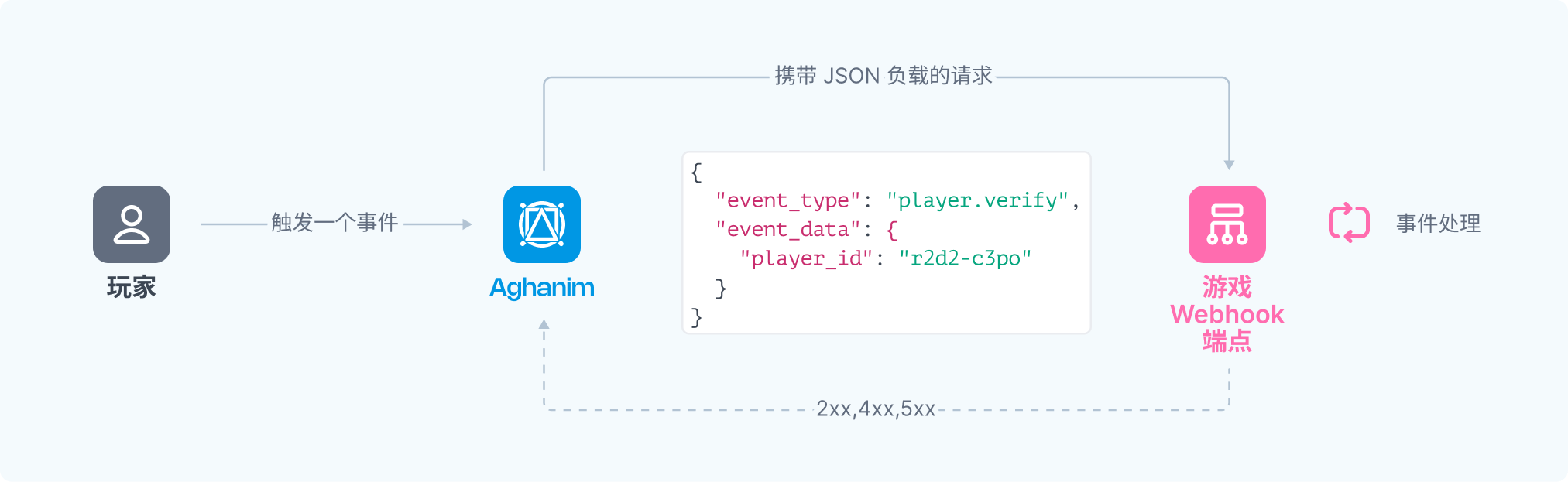
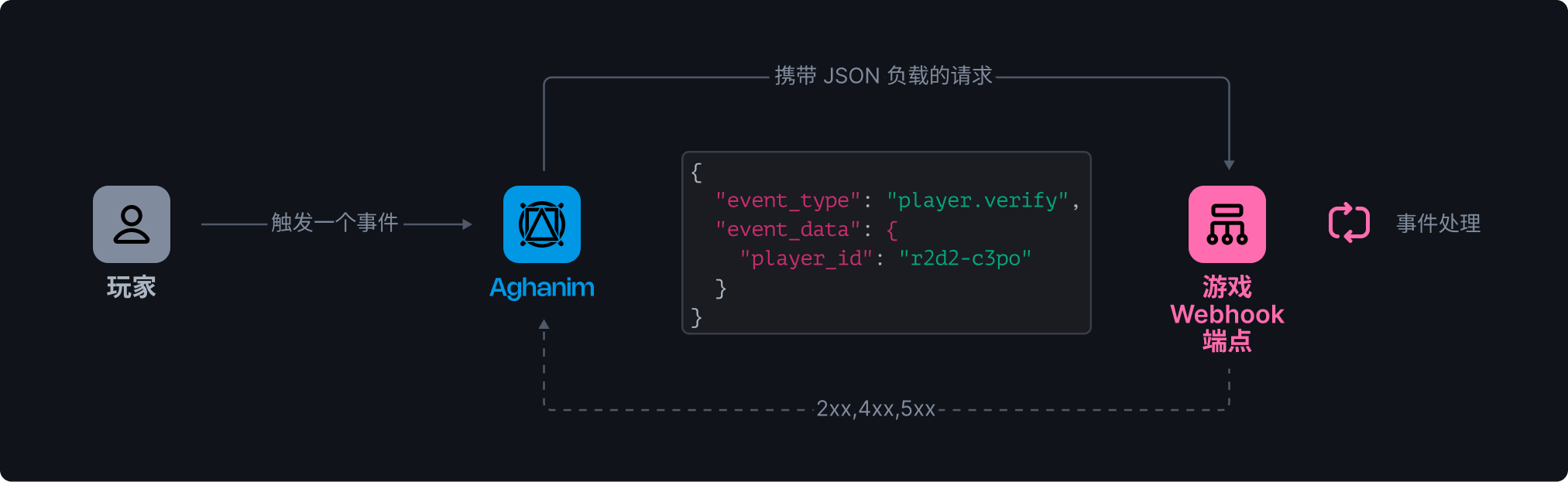
成功实现阿哈利姆集成所需处理的关键事件包括:
- 玩家验证事件 (
player.verify):当玩家尝试登录Game Hub时触发,您的服务器需要验证该玩家的身份并决定是否允许其访问。这是整个集成的基础环节。 - 商品添加事件 (
item.add):当玩家在Game Hub完成购买或获得奖励时触发,您的服务器需要将对应商品添加到玩家的游戏账户中,并确认交付成功。 - 商品移除事件 (
item.remove):当发生退款、订单取消或其他需要收回已发放商品的情况时触发,您的服务器需要从玩家账户中移除相关商品。
- player.verify
- item.add
- item.remove
{
  "event_type": "player.verify",
  "event_data": {"player_id": "2D2R-OP3C"},
  "event_id": "whevt_eCacGbJVbvToOgzjXUgOCitkQE",
  "event_time": 1725548450,
  "idempotency_key": null,
  "sandbox": false,
  "trigger": "hub.login",
  "request_id": "d1593e9c-c291-4004-8846-6679c2e5810b",
  "transaction_id": "whtx_eCacGbJVbvToOgzjXUgOCitkQE",
  "context": null,
  "game_id": "gm_exTAyxPsVwh",
}
{
  "event_type": "item.add",
  "event_data": {
    "player_id": "2D2R-OP3C",
    "items": [
      {
        "id": "itm_exTBZQmIlDz",
        "name": "水晶",
        "description": "用这巨大的水晶宝藏在竞争对手面前称霸。",
        "sku": "crystals",
        "quantity": 480000,
        "price": 9499,
        "price_decimal": 94.99,
        "currency": "USD",
        "type": "item",
        "nested_items": null
      }
    ],
    "reason": "使用迎新优惠券"
  },
  "event_time": 1725548450,
  "event_id": "whevt_eCacGbJVbvToOgzjXUgOCitkQE",
  "idempotency_key": "550e8400-e29b-41d4-a716-446655440000",
  "sandbox": false,
  "game_id": "gm_exTAyxPsVwh",
  "trigger": "order.paid",
  "request_id": "d1593e9c-c291-4004-8846-6679c2e5810b",
  "transaction_id": "whtx_eCacGbJVbvToOgzjXUgOCitkQE",
  "context": {
    "order": {
      "id": "ord_eCacAulggpY",
      "amount": 9499,
      "country": "US",
      "currency": "USD",
      "revenue_usd": 9499,
      "fees": {
        "payment_system_fee_usd": 2.85,
        "aghanim_fee_usd": 14.25,
        "taxes_usd": 7.65
      },
      "receipt_number": "AGH-123456",
      "status": "paid",
      "created_at": 1725548450,
      "paid_at": 1725548460,
      "creator": null
    }
  }
}
{
  "event_type": "item.remove",
  "event_data": {
    "player_id": "2D2R-OP3C",
    "items": [
      {
        "id": "itm_exTBZQmIlDz",
        "name": "水晶",
        "description": "用这巨大的水晶宝藏在竞争对手面前称霸。",
        "sku": "crystals",
        "quantity": 480000,
        "price": 9499,
        "price_decimal": 94.99,
        "currency": "USD",
        "type": "item",
        "nested_items": null
      }
    ],
    "reason": "使用迎新优惠券"
  },
  "event_time": 1725548450,
  "event_id": "whevt_eCacGbJVbvToOgzjXUgOCitkQE",
  "idempotency_key": "550e8400-e29b-41d4-a716-446655440000",
  "sandbox": false,
  "game_id": "gm_exTAyxPsVwh",
  "trigger": "order.refunded",
  "request_id": "d1593e9c-c291-4004-8846-6679c2e5810b",
  "transaction_id": "whtx_eCacGbJVbvToOgzjXUgOCitkQE",
  "context": {
    "order": {
      "id": "ord_eCacAulggpY",
      "amount": 9499,
      "country": "US",
      "currency": "USD",
      "revenue_usd": 9499,
      "fees": {
        "payment_system_fee_usd": 2.85,
        "aghanim_fee_usd": 14.25,
        "taxes_usd": 7.65
      },
      "receipt_number": "AGH-123456",
      "status": "canceled",
      "created_at": 1725548450,
      "paid_at": 1725548460,
      "creator": null
    }
  }
}
开发 Webhook 处理端点
要管理来自阿哈利姆的事件,您需要开发一个或多个函数。 实现 Webhook 处理机制时,您可以选择两种架构模式:1) 创建单一端点处理所有类型的事件;或 2) 为每种事件类型创建独立的专用端点。选择取决于您的系统架构和团队偏好。
您的函数应符合以下要求和逻辑:
- HTTPS 端点,可接收 POST Webhook 请求。
- 监听由阿哈利姆生成并 签名 的事件。
- 处理 Webhook 负载中包含的
idempotency_key,以防止重复处理 Webhook。 - 根据事件类型执行相应的业务逻辑,如验证玩家身份、更新游戏内商品库存、处理交易状态变更等,确保游戏系统与阿哈利姆数据保持同步。
- 实现标准化的响应机制,成功处理事件后返回 2xx 系列状态码,处理失败时返回适当的 4xx 或 5xx 状态码。 特别注意,当处理
player.verify事件时,成功响应必须包含符合 规定格式 的 JSON 数据,提供玩家的完整资料信息,以便阿哈利姆能够正确展示和处理玩家数据。
以下是处理阿哈利姆事件的单一端点实现示例框架(您可以根据自己的开发语言和框架进行调整):
- Python
- Ruby
- Node.js
- Go
# 使用以下示例代码来处理您集成环境中的 Webhook 事件。
#
# 1. 将此代码复制到新创建的 `server.py` 文件中。
#
# 2. 安装必要的依赖项:
#    python -m pip install fastapi[all]
#
# 3. 在 http://localhost:8000 地址上运行服务器
#    python server.py

import fastapi, hashlib, hmac, json, typing
from fastapi.responses import JSONResponse

app = fastapi.FastAPI()

@app.post("/webhook")
async def webhook(request: fastapi.Request) -> dict[str, typing.Any]:
    secret_key = "<YOUR_S2S_KEY>"  # 请替换为您的实际 Webhook Secret Key

    raw_payload = await request.body()
    payload = raw_payload.decode()
    timestamp = request.headers["x-aghanim-signature-timestamp"]
    received_signature = request.headers["x-aghanim-signature"]

    if not verify_signature(secret_key, payload, timestamp, received_signature):
        raise fastapi.HTTPException(status_code=403, detail="Invalid signature")

    data = json.loads(payload)
    event_type = data["event_type"]
    event_data = data["event_data"]

    raise fastapi.HTTPException(status_code=400, detail="Unknown event type")

def verify_signature(secret_key: str, payload: str, timestamp: str, received_signature: str) -> bool:
    signature_data = f"{timestamp}.{payload}"
    computed_hash = hmac.new(secret_key.encode(), signature_data.encode(), hashlib.sha256)
    computed_signature = computed_hash.hexdigest()
    return hmac.compare_digest(computed_signature, received_signature)

if __name__ == "__main__":
    import uvicorn
    uvicorn.run(app, host="0.0.0.0", port=8000)
# 使用以下示例代码来处理您集成环境中的 Webhook 事件。
#
# 1. 将此代码复制到新创建的 `server.rb` 文件中。
#
# 2. 安装必要的依赖项:
#    gem install sinatra json hmac
#
# 3. 在 http://localhost:8000 地址上运行服务器
#    ruby server.rb

require 'sinatra'
require 'json'
require 'openssl'

post '/webhook' do
  secret_key = "<YOUR_S2S_KEY>"  # 请替换为您的实际 Webhook Secret Key

  payload = request.body.read
  timestamp = request.env["HTTP_X_AGHANIM_SIGNATURE_TIMESTAMP"]
  received_signature = request.env["HTTP_X_AGHANIM_SIGNATURE"]

  unless verify_signature(secret_key, payload, timestamp, received_signature)
    halt 403, "Invalid signature"
  end

  data = JSON.parse(payload)
  event_type = data["event_type"]
  event_data = data["event_data"]

  halt 400, "Unknown event type"
end

def verify_signature(secret_key, payload, timestamp, received_signature)
  signature_data = "#{timestamp}.#{payload}"
  computed_signature = OpenSSL::HMAC.hexdigest('sha256', secret_key, signature_data)
  OpenSSL.secure_compare(computed_signature, received_signature)
end

if __FILE__ == $0
  require 'sinatra'
  set :bind, '0.0.0.0'
  set :port, 8000
end
// 使用以下示例代码来处理您集成环境中的 Webhook 事件。
//
// 1. 将此代码复制到新创建的 `server.js` 文件中。
//
// 2. 安装必要的依赖项:
//    npm install express
//
// 3. 在 http://localhost:8000 地址上运行服务器
//    node server.js

const express = require('express');
const crypto = require('crypto');

const app = express();

app.post('/webhook', express.raw({ type: "*/*" }), async (req, res) => {
  const secretKey = '<YOUR_S2S_KEY>'; // 请替换为您的实际 Webhook Secret Key

  const rawPayload = req.body;
  const timestamp = req.headers['x-aghanim-signature-timestamp'];
  const receivedSignature = req.headers['x-aghanim-signature'];

  if (!verifySignature(secretKey, rawPayload, timestamp, receivedSignature)) {
    return res.status(403).send('Invalid signature');
  }

  const payload = JSON.parse(req.body);
  const { event_type, event_data } = payload;

  return res.status(400).send('Unknown event type');
});

function verifySignature(secretKey, payload, timestamp, receivedSignature) {
  const signatureData = `${timestamp}.${payload}`;
  const computedSignature = crypto
    .createHmac('sha256', secretKey)
    .update(signatureData)
    .digest('hex');
  return crypto.timingSafeEqual(Buffer.from(computedSignature), Buffer.from(receivedSignature));
}

app.listen(8000, () => {
  console.log('Server is running on http://localhost:8000');
});
// 使用以下示例代码来处理您集成环境中的 Webhook 事件。
//
// 1. 将此代码复制到新创建的 `server.go` 文件中。
//
// 2. 在 http://localhost:8000 地址上运行服务器
//    go run server.go

package main

import (
  "crypto/hmac"
  "crypto/sha256"
  "encoding/hex"
  "encoding/json"
  "fmt"
  "io/ioutil"
  "net/http"
)

func webhookHandler(w http.ResponseWriter, r *http.Request) {
  secretKey := "<YOUR_S2S_KEY>"  // 请替换为您的实际 Webhook Secret Key

  rawPayload, _ := ioutil.ReadAll(r.Body)
  payload := string(rawPayload)
  timestamp := r.Header.Get("X-Aghanim-Signature-Timestamp")
  receivedSignature := r.Header.Get("X-Aghanim-Signature")

  if !verifySignature(secretKey, payload, timestamp, receivedSignature) {
    http.Error(w, "Invalid signature", http.StatusForbidden)
    return
  }

  var data map[string]interface{}
  if err := json.Unmarshal(rawPayload, &data); err != nil {
    http.Error(w, "Invalid payload", http.StatusBadRequest)
    return
  }

  eventType := data["event_type"].(string)
  eventData := data["event_data"].(map[string]interface{})

  http.Error(w, "Unknown event type", http.StatusBadRequest)
}

func verifySignature(secretKey, payload, timestamp, receivedSignature string) bool {
  signatureData := fmt.Sprintf("%s.%s", timestamp, payload)
  mac := hmac.New(sha256.New, []byte(secretKey))
  mac.Write([]byte(signatureData))
  computedSignature := hex.EncodeToString(mac.Sum(nil))
  return hmac.Equal([]byte(computedSignature), []byte(receivedSignature))
}

func main() {
  http.HandleFunc("/webhook", webhookHandler)
  fmt.Println("Server is running on http://localhost:8000")
  http.ListenAndServe(":8000", nil)
}
完成开发后,您可以使用以下命令在本地环境中测试您的 Webhook 处理端点:
- cURL
- Python
curl -X POST "https://your-webhook-endpoint.com/your/webhook/uri" \
  -H 'x-aghanim-signature-timestamp: <EVENT_TIMESTAMP>' \
  -H 'x-aghanim-signature: <HMAC-SHA256_SIGNATURE>' \
  -H 'user-agent: Aghanim/0.1.0' \
  -H 'content-type: application/json' \
  -H 'accept: */*' \
  -H 'host: your-webhook-endpoint.com' \
  -d '{
      "event_id": "whevt_eAeXhOxLwxy",
      "event_type": "player.verify",
      "idempotency_key": null,
      "event_data": {
          "player_id": "testplayer"
      },
      "context": null
  }'
import requests

# Endpoint URL
url = "https://your-webhook-endpoint.com/your/webhook/uri"

# Headers
headers = {
    'x-aghanim-signature-timestamp': '<EVENT_TIMESTAMP>',
    'x-aghanim-signature': '<HMAC-SHA256_SIGNATURE>',
    'user-agent': 'Aghanim/0.1.0',
    'content-type': 'application/json',
    'accept': '*/*',
    'host': 'your-webhook-endpoint.com'
}

# JSON payload
data = {
    "event_id": "whevt_eAeXhOxLwxy",
    "event_type": "player.verify",
    "idempotency_key": null,
    "event_data": {
        "player_id": "testplayer"
    },
    "context": null
}

# Make the POST request
response = requests.post(url, headers=headers, json=data)

# Print the response from the server
print(response.text)
在阿哈利姆注册 Webhook 端点
-
使您的端点可访问。
-
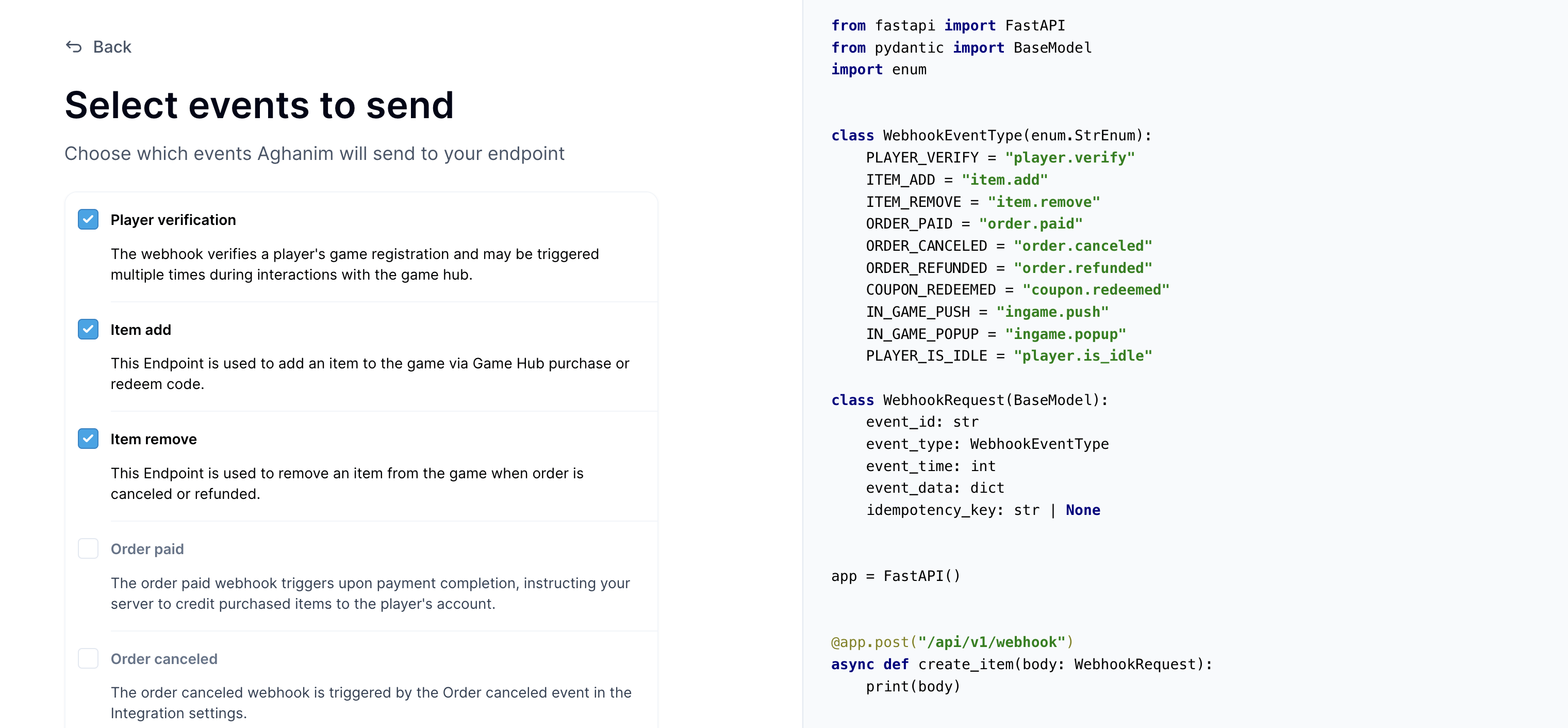
在 Aghanim 账户中注册您的端点,通过选择以下事件: Aghanim 账户 → 游戏 → Webhook → 新建 Webhook 。
- 玩家身份验证
- 添加商品(发货)
- 移除商品(扣货)
-
复制生成的 Secret Key,并在您的 Webhook 函数中指定它用于请求签名验证。
第 3 步:配置玩家身份验证系统
游戏枢纽的登录系统基于玩家 ID,该 ID 应为游戏内使用的唯一玩家标识符。
- 首先确定您游戏系统中哪个字段最适合作为玩家验证的主要标识符。 理想情况下,这应该选择一个在您的游戏系统中已经存在且保证唯一性的标识符。
- 设置完成后,当玩家尝试登录游戏枢纽或在其中执行需要验证的操作时,阿哈利姆会自动向您的服务器发送 Webhook 请求。 您的服务器需要验证这些请求中的玩家 ID,并根据您的业务规则决定是否授权访问。 请参考上文中 玩家验证 Webhook 部分的详细说明实现此功能。
- 为了帮助Game Hub用户顺利登录,请在Aghanim控制台的 游戏 → 设置 → Game Hub登录外观 部分添加清晰的指导说明,告知玩家如何找到并输入正确的身份验证数据。 提供详细的文本说明,介绍玩家如何在您的游戏中查找自己的 ID,并添加标注清晰的游戏界面截图作为视觉辅助。
第 4 步:探索自动生成的游戏枢纽
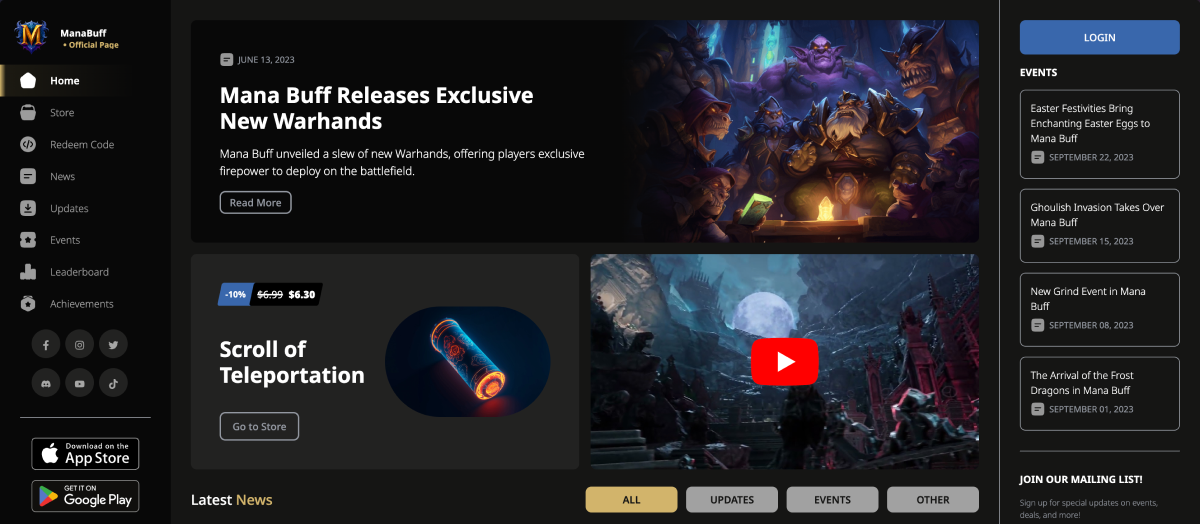
一旦您完成游戏链接过程,阿哈利姆会立即根据从应用商店和游戏数据中收集的信息,自动为您生成一个完整的游戏枢纽网站。 这个枢纽作为独立的网页平台,为玩家提供完整的游戏周边体验,包括商店购物、新闻公告、活动参与、排行榜、成就系统、每日奖励、限时优惠以及奖励码兑换等功能,所有内容均可根据您的品牌风格进行全面的视觉和功能定制。
阿哈利姆会自动从应用商店抓取您游戏的各种数据,用于初始化游戏枢纽的内容,这些数据包括:
- 游戏的 Logo
- 游戏内可购买商品的完整目录及其对应价格
- 游戏的最新公告、更新日志和新闻内容
- 当前正在进行的活动和即将推出的游戏事件
- 排行榜
对于应用商店中缺少的信息,阿哈利姆会使用 AI 辅助技术进行智能补充,自动生成或推荐缺失的内容元素,如商品图片、详细描述、新闻配图等,确保游戏枢纽初始状态就拥有丰富完整的内容。
要预览您的游戏枢纽,只需在阿哈利姆控制台中点击 游戏枢纽构建器 → 查看您的游戏枢纽 项,您将被引导至您专属的游戏枢纽网站。
第 5 步:启动玩家引导活动
恭喜!您的游戏枢纽已经配置完成,可以正式投入使用了! 现在是时候实施策略,将您的移动端玩家引导至网页游戏枢纽,通过精心设计的 LiveOps 活动激发他们的参与兴趣。
请从以下推广策略中选择至少一项来启动您的首次引流活动:
需要技术支持?
联系我们的集成技术团队: integration@aghanim.com